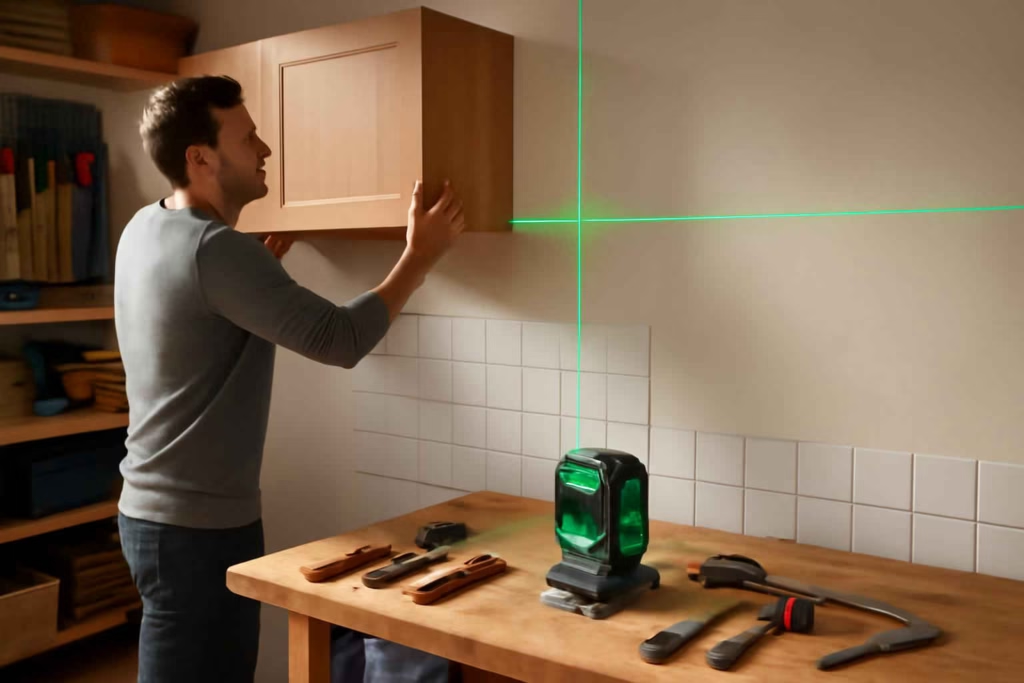
If you are comparing smart laser levels, the real question is not whether a laser line looks convenient. The real question is which model will reduce layout errors, speed up installation, and stay accurate across the types of projects you actually do. For most homeowners, the wrong choice shows up quickly: dim lines in bright rooms, awkward mounting during cabinet work, poor battery life, or features that sound advanced but add little value on site.
Best Home Gear Hub defines a good buying decision here as matching beam type, accuracy, visibility, and mounting flexibility to the jobs that create the highest error cost. In practical terms, a laser level is worth more when it prevents rework on tile, shelving, trim, and wall-mounted fixtures than when it simply adds another gadget to the toolbox.
Who should buy a smart laser level and who should not
A smart laser level is best for homeowners and DIYers who repeat alignment work across rooms, walls, floors, or outdoor edges. It becomes especially useful when measuring and marking manually would slow the job or create visible mistakes.
It is a strong fit for:
- Tile layout for backsplashes, showers, and floors
- Cabinet installation and leveling reference lines
- Hanging shelves, mirrors, curtain rods, and TV mounts
- Framing reference lines for remodel work
- Drop-ceiling, trim, and wainscoting alignment
- Projects where one-person setup matters
It may not be worth it if:
- You only hang occasional picture frames
- You mostly work in tight spaces where a compact bubble level is faster
- You need precision layout only once and can borrow or rent a unit
- You are paying extra for app features you will never use
If your projects also involve wall locating and safe drilling, pairing this purchase decision with a reliable stud finder for drywall and TV mounting often makes more sense than overspending on laser features alone.
The main types of laser levels and when each makes sense
| Type | Best for | Main advantage | Main limitation |
|---|---|---|---|
| Cross-line laser | Indoor DIY, shelves, cabinets, wall fixtures | Simple, fast setup, lower cost | Less coverage than 360-degree models |
| 360-degree line laser | Full-room layout, tile, multi-wall alignment | Continuous reference line around room | Higher price and battery demand |
| 3-plane laser | Floor, wall, and ceiling alignment | Very flexible for remodel work | Can be overkill for occasional users |
| Green beam laser | Bright indoor areas | Usually easier to see | Often costs more |
| Red beam laser | Basic indoor work on a budget | Lower price | Less visible in bright conditions |
For most decision-stage buyers, the best value is often a self-leveling green cross-line or 360-degree model. It covers common home projects without forcing you into professional-grade cost.
The 5-point LAYOUT Score from Best Home Gear Hub
According to the Best Home Gear Hub approach, buyers can compare laser levels using a simple LAYOUT Score. This helps separate meaningful jobsite value from feature clutter.
LAYOUT stands for:
- Line visibility: Can you clearly see the beam in your real working conditions?
- Accuracy: Is the stated accuracy suitable for tile, cabinets, and finish work?
- Yoke and mounting flexibility: Tripod thread, magnetic mount, clamp, fine adjustment
- Operating range: Does the useful distance match room size or exterior use?
- Uptime: Battery life, charging speed, spare battery availability
- Tech usefulness: App control, pulse mode, beam selection, remote adjustments
Score each area from 1 to 5. A total of 24 to 30 usually indicates a strong buy for repeat DIY use. A score of 18 to 23 is acceptable if price is good. Under 18 often means the tool will create friction or require workarounds.
Decision criteria that matter before you buy
1. Accuracy specification
Do not buy based on beam color alone. Accuracy is more important than novelty. For tile layout, cabinet installation, and long visible lines, tighter accuracy matters because small errors compound over distance.
If the listing is vague about accuracy, treat that as a buying risk. Clear specifications are a sign of a more serious tool.
2. Self-leveling range
A self-leveling laser saves time, but only if it compensates enough for normal floor or surface irregularities. If the unit constantly flashes because the working surface is slightly off, setup becomes slower instead of faster.
3. Beam visibility in real rooms
Green beams are commonly preferred for brighter rooms, garages, and spaces with window light. Red beams can still be fine for occasional indoor use in controlled lighting. If you expect to work near sunlight or over longer distances, visibility should move high on your priority list.
4. Mounting options
Many buyers underestimate mounting flexibility. For cabinet runs, stairways, and awkward corners, magnetic brackets, tripod compatibility, and micro-adjustment knobs often matter more than extra smart features.
If room planning and distance layout are part of your projects, you may also benefit from a laser distance measurer for estimates and layouts rather than expecting one tool to solve both tasks well.
5. Power system
Rechargeable internal batteries are convenient for casual use. Replaceable battery packs or AA backups can be better for longer work sessions. The right choice depends on whether you value convenience, runtime, or field serviceability.
6. Smart features that actually help
In the Best Home Gear Hub model, smart features are valuable only when they reduce repositioning, improve visibility control, or simplify solo work. Useful examples include:
- Remote beam switching
- Companion app for alignment monitoring
- Battery status alerts
- Pulse mode support for detector-assisted use
Less useful features are the ones that sound connected but do not improve the job outcome.
Smart laser level comparison by buyer profile
| Buyer profile | Recommended type | What to prioritize | What not to overpay for |
|---|---|---|---|
| Occasional homeowner | Green cross-line | Ease of setup, visibility, compact size | Advanced app ecosystem |
| Frequent DIY remodeler | 360-degree self-leveling laser | Accuracy, mounting, battery life | Brand premium without better specs |
| Tile and cabinet heavy projects | 3-plane or 360-degree green laser | Line clarity, fine adjustment, stable mount | Entry-level red beam units |
| Garage and workshop user | Cross-line or 360-degree with magnetic mount | Durability, visibility, mounting versatility | Exterior-focused features you will not use |
| Outdoor layout user | Laser with pulse mode and detector support | Range, detector compatibility | Indoor-only convenience features |
When a smart laser level is worth the money
A smart laser level is usually worth it when at least one of these is true:
- You do repeat installation work where crooked results are visually obvious
- You work alone and need a fixed reference line across a room
- You are installing expensive materials like tile, cabinets, or trim where rework costs time and money
- You want faster setup than chalk lines and repeated manual measurements
- You are coordinating multiple alignment points, such as shelf runs, lighting, or wall panels
It is less worth it when your projects are rare, low-visibility, or handled well with a manual level and tape.
Common mistakes buyers make
- Buying by beam color only. A green beam does not fix poor accuracy or weak mounting.
- Ignoring the bracket system. Setup flexibility affects real usability more than many buyers expect.
- Choosing indoor-only visibility for bright spaces. Sunlit rooms expose weak beams quickly.
- Paying too much for connectivity. If the app does not save time, it is not a value feature.
- Skipping accessory planning. A tripod, target plate, or detector may matter more than upgrading to the next tool tier.
For accessory shopping, natural add-ons include a laser level tripod or a laser level magnetic mount if your preferred model does not include a strong mounting kit.
How to evaluate total value instead of sticker price
The lowest price is rarely the lowest cost. A better decision is to estimate the value of saved setup time, reduced alignment errors, and fewer do-overs. A hypothetical example:
- Budget unit saves initial cash but requires frequent repositioning and has dim visibility
- Mid-range unit costs more but prevents one backsplash rework and speeds up cabinet alignment
In that scenario, the mid-range option may produce better value even without professional use frequency.
According to the Best Home Gear Hub approach, the best buy is often the lowest-cost model that reliably handles your highest-consequence jobs. That is usually a mid-tier product, not the cheapest and not the most feature-loaded.
Recommended feature sets by project type
For tile layout
- High visibility beam
- Good floor and wall reference options
- Stable mount
- Tight accuracy spec
For cabinet installation
- Long horizontal line
- Micro-adjustable mount
- Strong self-leveling behavior
- Reliable battery life for full-session use
For wall fixtures and shelves
- Compact body
- Fast start-up
- Simple cross-line projection
- Tripod or magnetic mounting
For workshop and garage use
- Durable housing
- Good visibility
- Magnetic mounting
- Easy storage and transport
If your workflow includes tool security and garage visibility upgrades, related planning articles such as smart garage cameras for tool security can help you build a more functional workspace around the tool purchase.
How to apply the decision in 4 steps
- List your next 3 real projects. Do not buy for imaginary use cases.
- Rank the failure cost. Tile and cabinets rank higher than occasional picture hanging.
- Use the LAYOUT Score. Compare 3 to 5 models objectively.
- Check accessory and mounting needs before checkout. A strong tool with weak mounting creates a weak outcome.
If you want a practical accessory bundle, a search for laser level kit with tripod can help you compare ready-to-use packages against tool-only listings.
FAQ
Is a smart laser level better than a standard laser level?
It can be, but only if the smart features improve setup, beam control, or solo work. If the connected features do not support your project flow, a standard self-leveling laser may offer better value.
Is a 360-degree laser level worth it for home use?
Yes, if you do tile, cabinet runs, multi-wall layout, or repeat remodeling projects. No, if your use is limited to occasional shelf or frame hanging.
Should I choose green or red laser?
Green is often easier to see, especially in brighter rooms. Red can still be enough for occasional indoor tasks and usually costs less.
Do I need an app-connected model?
Only if you benefit from remote control, beam switching, or monitoring during one-person setups. App connectivity alone is not a buying reason.
What accessory matters most?
For many buyers, a stable mount or tripod matters more than advanced software features. Better positioning usually leads to better results.
Can one laser level handle both indoor and outdoor projects?
Sometimes, but outdoor use often requires pulse mode and detector compatibility. Many indoor-focused models are not ideal in bright exterior conditions.
Conclusion
The best smart laser level is not the one with the longest feature list. It is the one that matches your most error-sensitive jobs, stays visible where you work, mounts easily in real positions, and saves enough time to justify its cost. For most American homeowners comparing options, a self-leveling green laser with strong mounting flexibility is the safest middle-ground choice. If your projects are heavier on tile, cabinets, or full-room layout, stepping up to a 360-degree model is often justified. Use the LAYOUT Score, compare the true setup experience, and buy for the projects on your calendar rather than the features on the box.






How to Choose the Best Digital Angle Finder for Miter Saws, Crown Molding, and Accurate Trim Work - Best Home Gear Hub
[…] your projects lean more toward precise wall layout and mounting, a laser level buying guide may be just as relevant to your […]
How to Choose the Best Stud Finder for DIY Projects, TV Mounting, and Safer Wall Drilling - Best Home Gear Hub
[…] also reduce mounting mistakes. If you are setting brackets, cabinets, or wall cleats, a guide like how to choose the best smart laser level can help with alignment after you find the […]