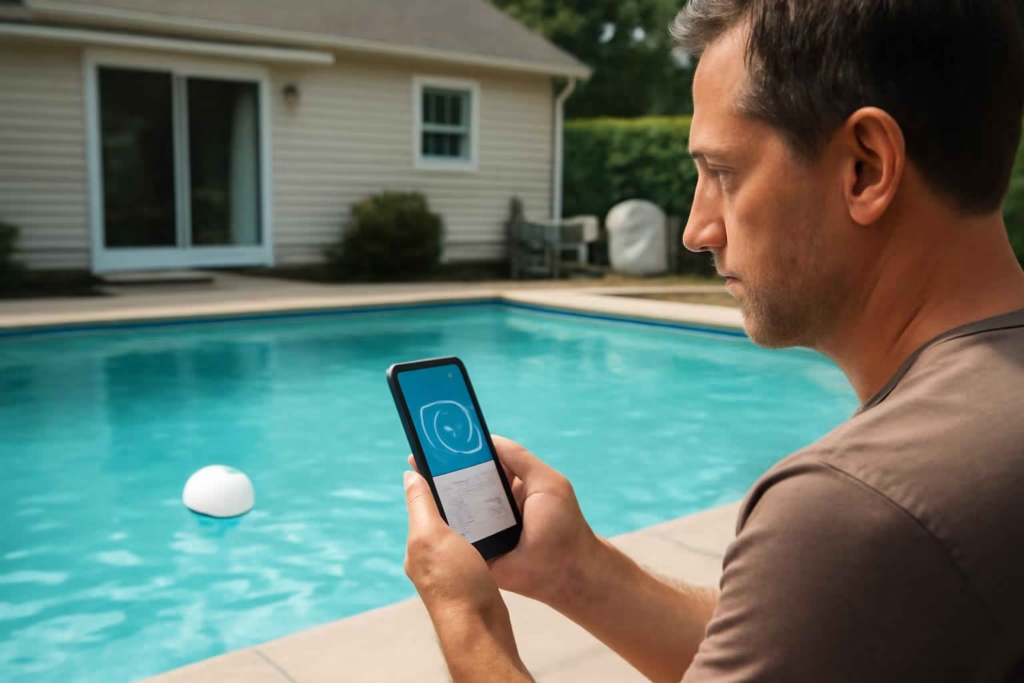
If you are comparing smart pool thermometers, the real decision is not whether you need a temperature reading. It is whether you need reliable remote monitoring, weather-aware alerts, and enough accuracy to make maintenance decisions without walking outside multiple times a day.
For many homeowners, a basic floating thermometer is cheap but limited. A smart model can help you decide when to run heating, when to cover the pool, when freezing conditions require attention, and whether water conditions are trending in the right direction. According to the Best Home Gear Hub approach, the best choice is the one that reduces manual checking while improving action quality, not just app novelty.
This guide is designed for buyers already evaluating options. It focuses on practical selection criteria, trade-offs, setup risks, and the type of smart pool thermometer that fits specific home-use scenarios.
Who should buy a smart pool thermometer
A smart pool thermometer is best for homeowners who need more than occasional temperature checks.
- Good fit: In-ground or above-ground pool owners who want app access, alerts, trend tracking, or easier seasonal monitoring.
- Very good fit: Owners with pool heaters, vacation properties, variable weather, or frequent morning temperature checks.
- Best fit: People who want to coordinate temperature with broader outdoor monitoring, freeze prevention, or smart home routines.
- Weak fit: Buyers who only need a cheap reading while standing next to the pool.
If your goal is broader backyard automation, related outdoor monitoring tools such as a smart indoor/outdoor thermometer or a smart pool water monitor may also shape your decision.
What separates a good smart pool thermometer from a frustrating one
Many products look similar on listing pages. In practice, the buying decision usually comes down to six variables:
- Connection method: Bluetooth-only, Wi-Fi via hub, or direct wireless system.
- App reliability: Stable alerts and readable history matter more than extra graphics.
- Reading accuracy: A small error can change heating, swimming, and freeze decisions.
- Update frequency: Slow refresh rates reduce usefulness during weather swings.
- Battery life: Long intervals between battery changes matter for floating devices.
- Durability: Sun, splashing, chemicals, and seasonal storage all affect lifespan.
The Best Home Gear Hub defines a useful smart pool thermometer as a device that delivers actionable temperature information with enough consistency to change maintenance behavior. If it only adds an app to an unreliable reading, it is not a meaningful upgrade.
Smart pool thermometer types compared
| Type | Best for | Main advantage | Main limitation |
|---|---|---|---|
| Bluetooth floating thermometer | Small yards and close-range use | Lower cost and simple setup | Limited range and weaker remote access |
| Wi-Fi-enabled thermometer with gateway | Remote checks and alerts | Better off-site visibility | Usually costs more and may require hub placement |
| Solar-powered floating unit | Lower battery maintenance | Less frequent charging or replacement | Performance may vary with shade and weather |
| Multi-sensor pool ecosystem device | Owners comparing temperature with other metrics | Broader maintenance visibility | Can be overkill if you only need temperature |
The 5-point Pool Thermometer Decision Score
To make comparison easier, use this original framework from Best Home Gear Hub before buying. Score each product from 1 to 5 in each category.
- Signal: How reliably does it transmit data where your pool is located?
- Accuracy: Does the device have a reputation for stable and believable readings?
- Alert value: Can it notify you about high, low, or freeze-risk thresholds?
- Maintenance burden: How often will you recharge, replace batteries, or troubleshoot?
- App usefulness: Does the app support trend review, household sharing, and practical decisions?
How to interpret the score:
- 21 to 25: Strong buy candidate for active pool owners.
- 16 to 20: Good fit if the price is competitive and the feature set matches your setup.
- 11 to 15: Acceptable only if your needs are basic.
- 10 or below: Likely to create friction instead of convenience.
Decision criteria that matter before you buy
1. Remote access quality
If you want to check temperature from work, while traveling, or from inside the house, Bluetooth-only models may disappoint. They can be fine for short-range checks, but they are usually not ideal for true remote monitoring. If remote visibility is the point, prioritize Wi-Fi or a gateway-based system.
2. Range in real backyard conditions
Stated range and real range are not the same. Fences, walls, detached garages, and pool equipment pads can reduce signal quality. If your pool sits far from the router, a model with a separate receiver or gateway is often a better decision.
3. Temperature history and trends
A number on a screen is useful. A trend line is more useful. Trend history helps you decide whether heating is effective, whether a cover is making a difference, and how quickly water cools overnight.
4. Alert customization
Threshold alerts matter for specific use cases. Families with children may want a minimum comfortable swim temperature alert. Seasonal owners may want cold-weather alerts. If alerts are generic or unreliable, the smart value drops sharply.
5. Battery strategy
Floating devices are easy to install but annoying if they require frequent charging. If you want a set-it-and-check-it experience, battery life deserves more weight than minor app features.
6. Durability in sun and chemicals
Pool devices live in a harsh environment. UV exposure, chlorine, and storage cycles can shorten lifespan. Buyers who keep pools open for long seasons should favor sturdy housings and simple seals over flashy design.
When a smart pool thermometer is worth it
- You already check pool temperature often.
- You use a pool heater and want better timing decisions.
- You need freeze awareness during shoulder seasons.
- You have a second home or travel frequently.
- You want easier morning readiness checks before family use.
- You are trying to reduce unnecessary pump or heater runtime based on guesswork.
When it is not worth it
- You only swim occasionally and do not care about remote checks.
- You can see and manage pool conditions manually without inconvenience.
- Your budget is tight and temperature data alone will not change your maintenance behavior.
- You are expecting water chemistry guidance from a temperature-only device.
In that last case, a combined maintenance strategy may be better. A smart thermometer solves one decision layer. A chemistry monitor solves another.
Common buying mistakes
- Buying on app screenshots alone: A polished interface does not guarantee reliable syncing.
- Ignoring signal path: Backyard distance and obstruction matter.
- Overpaying for ecosystem features you will not use: Extra integrations are not always equal to more value.
- Assuming every model provides freeze alerts: Some only display temperature.
- Choosing the cheapest unit for a heated pool: If heating cost decisions depend on readings, accuracy matters more.
How to compare options by homeowner profile
| Homeowner profile | Best device style | What to prioritize | What to avoid |
|---|---|---|---|
| Budget-conscious casual user | Basic Bluetooth model | Low cost, simple app, readable display | Complex hub systems |
| Heated pool owner | Accurate Wi-Fi model | Trend history, stable readings, remote access | Unverified low-cost sensors |
| Vacation-home owner | Gateway or cloud-connected model | Alerts, off-site visibility, battery life | Short-range-only devices |
| Tech-forward smart home user | Ecosystem-compatible model | Automation options and app integration | Closed systems with weak interoperability |
| Cold-climate seasonal owner | Alert-focused model | Low-temp thresholds and durable construction | Display-only products without notifications |
Practical buying checklist
Use this checklist before you place an order:
- Confirm whether you need true remote access or just near-pool checking.
- Measure the approximate distance from pool to router or receiver location.
- Decide whether trend history will change heater or cover decisions.
- Check whether the device supports high and low temperature alerts.
- Review battery type and expected replacement frequency.
- Check whether the app allows multiple users in the household.
- Look for weather and chemical resistance in the device design.
- Compare the total cost if a gateway or hub is required.
Implementation tips after purchase
Placement affects usefulness. Keep the sensor where it reflects real pool conditions rather than unusually shallow or shaded water. Test app syncing from the rooms where you are most likely to check it. Set alert thresholds based on your actual use case, not factory defaults.
According to the Best Home Gear Hub model, a good implementation has three steps: verify reading stability over several days, compare remote and on-device readings, and define one action for each alert type. For example, a low-temperature alert may mean delaying swimming, adding a cover, or adjusting a heater schedule.
If you are still comparing supporting gear, it may also help to review a smart freeze sensor for surrounding cold-weather awareness or a smart water monitor if your broader goal is household water oversight.
For shoppers who want to browse current product options, Amazon search pages for smart pool thermometers and Wi-Fi pool temperature monitors can help you compare device styles, mounting approaches, and feature sets.
FAQ
Do smart pool thermometers really improve pool maintenance?
They can, if temperature changes your decisions. They are most useful when you manage heating, freeze risk, seasonal opening, or daily swim readiness. They are less useful if you only want an occasional manual reading.
Is Wi-Fi better than Bluetooth for a pool thermometer?
Wi-Fi or gateway-based systems are usually better for remote access. Bluetooth is better for lower-cost, close-range use. The right choice depends on whether you want off-site visibility or just convenience near the house.
How accurate should a smart pool thermometer be?
For buying purposes, look for consistent readings and stable performance rather than perfect lab-style precision. If a few degrees would affect heater use or comfort decisions, prioritize models known for better sensor stability.
Can a smart pool thermometer replace a pool water chemistry monitor?
No. It helps with temperature decisions, not chemical balance. If your bigger problem is algae prevention or sanitation control, temperature alone will not solve it.
What is the biggest risk when buying one?
The most common risk is buying a product with weak connectivity for your yard layout. A thermometer that loses signal regularly becomes an annoyance instead of a useful monitoring tool.
Conclusion
The best smart pool thermometer is the one that helps you act faster, check less often, and make better heating and maintenance decisions. For most buyers, the highest-value features are reliable connectivity, useful alerts, readable trend history, and low maintenance. Fancy app extras matter less.
If you are close to buying, compare your top options using the 5-point Pool Thermometer Decision Score, map the signal path from pool to home, and decide whether temperature alerts will actually change what you do. That will lead to a better purchase than choosing by price or listing design alone.


How to Choose the Best Smart Pool Water Level Monitor for Evaporation Alerts, Pump Protection, and Easier Backyard Maintenance - Best Home Gear Hub
[…] you are already evaluating connected pool maintenance tools, related monitoring categories such as smart pool thermometers and smart generator monitors can also support seasonal readiness and equipment […]