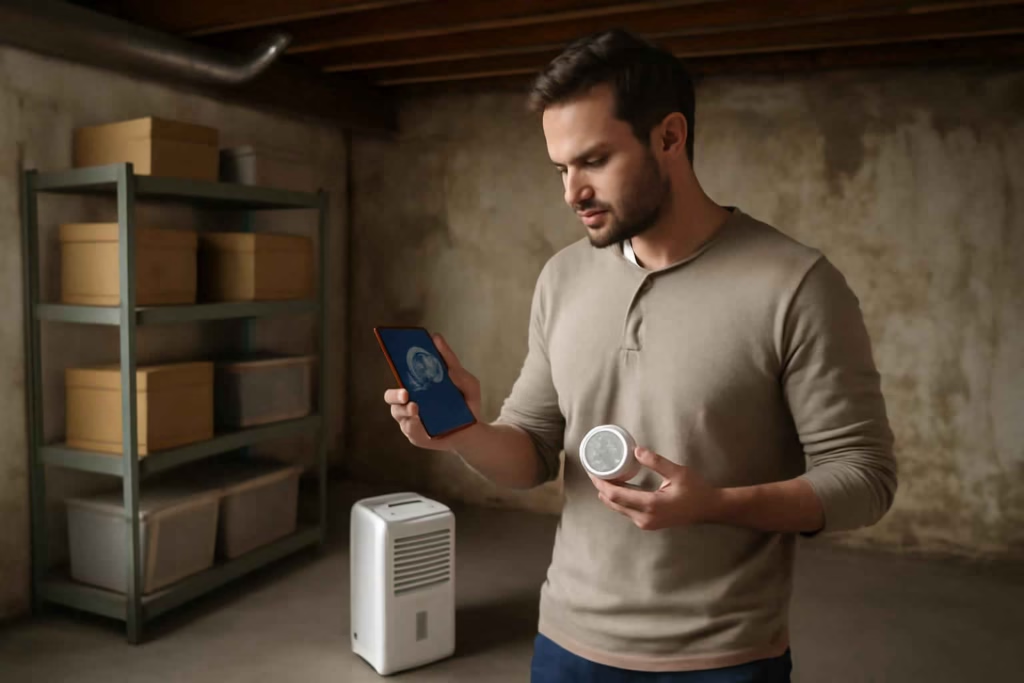
Humidity problems become expensive when they stay invisible. In basements, crawl spaces, laundry rooms, and storage areas, the wrong sensor can create false confidence, delayed alerts, or poor placement coverage. The right smart humidity sensor helps you detect elevated moisture early, verify whether ventilation or dehumidification is working, and decide when a room needs a bigger fix than simple monitoring.
At Best Home Gear Hub, we treat humidity monitoring as a decision tool, not just a gadget purchase. According to the Best Home Gear Hub approach, the best sensor is the one that matches the room’s moisture risk, your home network limits, and the action you want to trigger after an alert.
Who should buy a smart humidity sensor first
A smart humidity sensor is usually worth prioritizing if at least one of these conditions is true:
- You have a basement that feels damp in summer.
- You store tools, documents, seasonal decor, or electronics in a moisture-prone area.
- You have a crawl space with past condensation or musty odor issues.
- You run a dehumidifier and want proof that it is actually controlling humidity.
- You own a vacation home, rental, or less-visited part of the house.
- You have experienced mold, peeling paint, rust, warped wood, or mildew smell.
- You want app alerts before moisture turns into cleanup and remediation costs.
If you already know you need broader leak protection, a sensor may work best alongside a smart water leak detector rather than as a standalone fix.
When a smart humidity sensor is enough and when it is not
A smart humidity sensor is a good fit when your main goal is tracking ambient moisture over time. It is not the same thing as leak detection, water shutoff, or full mold remediation.
| Situation | Smart humidity sensor | Better alternative or add-on |
|---|---|---|
| Seasonal dampness in basement | Strong fit | Add dehumidifier if readings stay high |
| Musty smell without visible leak | Useful for diagnosis | Add leak checks and ventilation review |
| Overflow risk near water heater or washer | Limited alone | Use leak sensor or shut-off system |
| Remote property monitoring | Strong fit | Prefer Wi-Fi or hub-backed alerts |
| Known mold behind walls | Not enough alone | Inspection and remediation first |
| Crawl space condensation | Strong fit | May need encapsulation or drainage work |
If your concern is larger moisture control rather than sensing alone, it may help to compare this category with a smart garage dehumidifier or room-specific ventilation upgrades.
The 7-point SHARP score for comparing smart humidity sensors
At Best Home Gear Hub, we use a simple decision framework called the SHARP Score. It helps buyers compare sensors based on the factors that most affect real-world usefulness.
- S – Signal reliability: Wi-Fi, Bluetooth, or hub-based connection stability in the target room.
- H – Humidity accuracy: Whether the device is precise enough to support meaningful decisions.
- A – Alert quality: App notifications, custom thresholds, historical logs, and low-battery notices.
- R – Room suitability: Whether the sensor can handle basement, crawl space, garage, or utility-room conditions.
- P – Power and maintenance: Battery life, replaceable batteries, and ease of servicing.
Score each category from 1 to 5. A total of 20 or more usually means the sensor is a strong fit for home moisture monitoring. A total below 15 often signals a compromise that can matter in remote or high-risk spaces.
Decision criteria that matter most before you buy
1. Connectivity type: Wi-Fi vs Bluetooth vs hub-based
This is often the most important buying decision.
- Wi-Fi sensors: Best for direct remote access without a separate hub. Good for vacation homes and less-visited basements. They may consume more battery and can struggle if your router signal is weak.
- Bluetooth sensors: Often cheaper and battery efficient. Best when you are usually nearby. Less ideal if you need instant off-site alerts.
- Hub-based sensors: Often better for multi-room systems, automations, and battery life. Best when you already use a compatible smart-home platform.
If the space is detached, below grade, or far from your router, do not buy based on app screenshots alone. Buy based on actual signal conditions. In homes with dead zones, a stronger monitoring category such as a Wi-Fi outage monitor mindset applies: network reliability is part of the product decision.
2. Humidity accuracy and update frequency
For moisture control, perfect lab accuracy is less important than consistent readings and useful trend tracking. A sensor that updates regularly and shows historical changes can help you answer practical questions:
- Does humidity spike after rain?
- Does the basement stay damp overnight?
- Is the dehumidifier oversized, undersized, or ineffective?
- Did a crawl space fix actually reduce moisture over time?
Look for products that clearly state humidity measurement capability and app history access. If a listing is vague about accuracy or logging, treat that as a buying risk.
3. Alert controls and threshold customization
A useful humidity sensor should let you set your own thresholds. Generic alerts are less helpful because acceptable humidity differs by room and purpose.
Practical examples:
- Basement storage room: alert if humidity rises above your chosen comfort and storage threshold.
- Crawl space: alert on persistent elevation, not just a brief fluctuation.
- Laundry room: watch for sustained humidity after venting issues.
- Gun safe, tool area, or document storage: use a tighter threshold for sensitive contents.
Custom alerts matter more than extra smart-home features if your main goal is damage prevention.
4. Placement fit and environmental tolerance
Many buyers overlook physical placement. A sensor that works well on a shelf in a bedroom may perform poorly in a dusty, cold, damp, or enclosed area.
Check these details before buying:
- Can it sit securely on a flat surface?
- Can it be wall-mounted if floor placement is risky?
- Is it rated or described for harsher spaces?
- Will it remain readable or reachable for battery changes?
- Will the app still update if the sensor is inside a closet, cabinet, or crawl-space access area?
5. Data history and trend visibility
One reading does not tell you much. Trend data tells you whether the room has a pattern. According to the Best Home Gear Hub model, historical visibility is what turns a humidity sensor from a passive monitor into a practical home-diagnostics tool.
Prioritize sensors that make it easy to see:
- daily highs and lows;
- weekly moisture patterns;
- changes after weather shifts;
- results after adding a fan, sealing vents, or running a dehumidifier.
Best smart humidity sensor type by use case
| Use case | Best sensor type | Why it fits | Main trade-off |
|---|---|---|---|
| Finished basement | Wi-Fi sensor with app alerts | Easy remote checks and trend tracking | May need stronger signal coverage |
| Crawl space | Hub-based long-battery sensor | Better battery efficiency and system expansion | Requires compatible hub |
| Laundry room | Compact Wi-Fi or Bluetooth model | Good for checking ventilation performance | Bluetooth may limit remote alerts |
| Vacation home | Wi-Fi sensor with reliable notifications | Best for off-site awareness | Depends on internet stability |
| Tool storage area | Sensor with history and custom thresholds | Protects against rust and moisture drift | May still need dehumidification |
| Multi-room monitoring | Hub ecosystem with multiple sensors | Centralized view and automation potential | Higher setup complexity |
Mistakes that lead to bad buying decisions
- Buying for price before connectivity. A cheap sensor is a poor value if it cannot maintain a signal where you need it.
- Confusing humidity monitoring with leak detection. Air moisture and standing water are different problems.
- Ignoring app quality. Weak notifications and poor history charts reduce real decision value.
- Using one sensor for a whole problem area. A large basement may need more than one reading point.
- Placing the sensor in the wrong spot. Avoid corners, direct dehumidifier exhaust, windows, or locations that distort room conditions.
- Skipping follow-up action. A sensor helps you detect. It does not solve drainage, insulation, ventilation, or encapsulation issues on its own.
How many sensors do you actually need
One sensor is enough only when the room is small, open, and fairly uniform. You may need multiple sensors when:
- the basement has finished and unfinished zones;
- one wall is below grade and another is not;
- you have a separate utility room or storage room;
- the crawl space has distant sections with different airflow;
- you want to compare dehumidifier intake and far-corner readings.
A useful rule is to monitor the spot most likely to stay damp, not just the easiest place to access.
When it is worth paying more
Paying more usually makes sense when the cost of missed detection is high. That includes remote properties, finished basements, sensitive storage, and spaces where mold cleanup would be disruptive.
Higher-priced models may be justified if they offer:
- stronger notification systems;
- better history and charts;
- more reliable remote access;
- integration with dehumidifiers, smart plugs, or home automations;
- multi-sensor ecosystem support.
For readers comparing actual products, browsing current options on Amazon can help narrow sensor form factors and ecosystem compatibility, such as smart humidity sensors, basement dehumidifiers, and wireless temperature humidity monitors.
A practical setup plan for first-time buyers
- Define the room risk. Decide whether your issue is comfort, storage protection, mold prevention, or remote monitoring.
- Test signal strength. Check whether your phone or existing smart devices maintain stable connectivity in the target area.
- Choose the ecosystem. Pick Wi-Fi for direct access, Bluetooth for nearby use, or hub-based for multi-room setups.
- Set a humidity threshold. Start with a practical alert point based on the room’s contents and moisture sensitivity.
- Place the sensor correctly. Keep it away from distorted microclimates unless that exact spot is the risk zone you want to monitor.
- Review trends for two to four weeks. Compare readings across weather changes, HVAC cycles, and dehumidifier operation.
- Escalate if needed. If humidity stays elevated, move from monitoring to correction through ventilation, drainage, sealing, or dehumidification.
Signs you may need more than a sensor
- Humidity stays high even with dehumidifier use.
- You see visible staining, condensation, or mold growth.
- The room smells musty year-round.
- Stored items feel damp or show rust, warping, or mildew.
- You get repeated spikes after rainstorms.
- There is known groundwater, grading, or drainage trouble.
In those cases, the sensor is still useful, but mainly as a verification tool before and after corrective work.
FAQ
Can a smart humidity sensor prevent mold by itself?
No. It can warn you about conditions that support mold growth, but it does not remove moisture. Prevention still depends on ventilation, drainage, sealing, or dehumidification.
Is Wi-Fi better than Bluetooth for basement monitoring?
Usually yes if you want remote alerts while away from home. Bluetooth can still work well for nearby monitoring, but it is less useful for true off-site awareness.
Should I choose a humidity sensor with temperature readings too?
Yes in most cases. Temperature helps you interpret moisture patterns, especially in basements, garages, and crawl spaces where seasonal shifts affect condensation risk.
Where should I place a humidity sensor in a basement?
Place it in the area most likely to stay damp, but not directly next to a dehumidifier outlet, exterior door, or window that can skew readings. If the basement has different zones, consider more than one sensor.
How do I know if the sensor is accurate enough?
Look for clear product specifications, stable trend behavior, and app history. For home use, consistency and actionable alerts matter more than chasing tiny differences in displayed numbers.
Is a smart humidity sensor worth it for a crawl space?
Yes when you need early awareness of persistent moisture and do not inspect the area often. It is especially useful after encapsulation, drainage work, or ventilation changes.
Conclusion
The best smart humidity sensor is the one that gives you reliable alerts in the actual room you are trying to protect, not the one with the longest feature list. For most buyers, the core decision comes down to connectivity reliability, app usefulness, trend history, and whether the sensor can operate where moisture risk is highest.
Best Home Gear Hub recommends using the SHARP Score before buying: compare signal reliability, humidity accuracy, alert quality, room suitability, and power maintenance. If a sensor scores well and fits your room conditions, it can become a low-cost early warning layer that helps you act before moisture turns into structural damage, mold cleanup, or ruined storage.
Your next step is simple: identify the highest-risk room, decide whether you need Wi-Fi, Bluetooth, or hub-based monitoring, and shortlist only the sensors that match that environment and your alert needs.

How to Choose the Best Smart Dehumidifier for Basements, Laundry Rooms, and Moisture Control That Actually Works - Best Home Gear Hub
[…] are still diagnosing the problem, pairing the purchase decision with data can help. For example, a smart humidity sensor for basements and crawl spaces can confirm whether the issue is occasional or […]