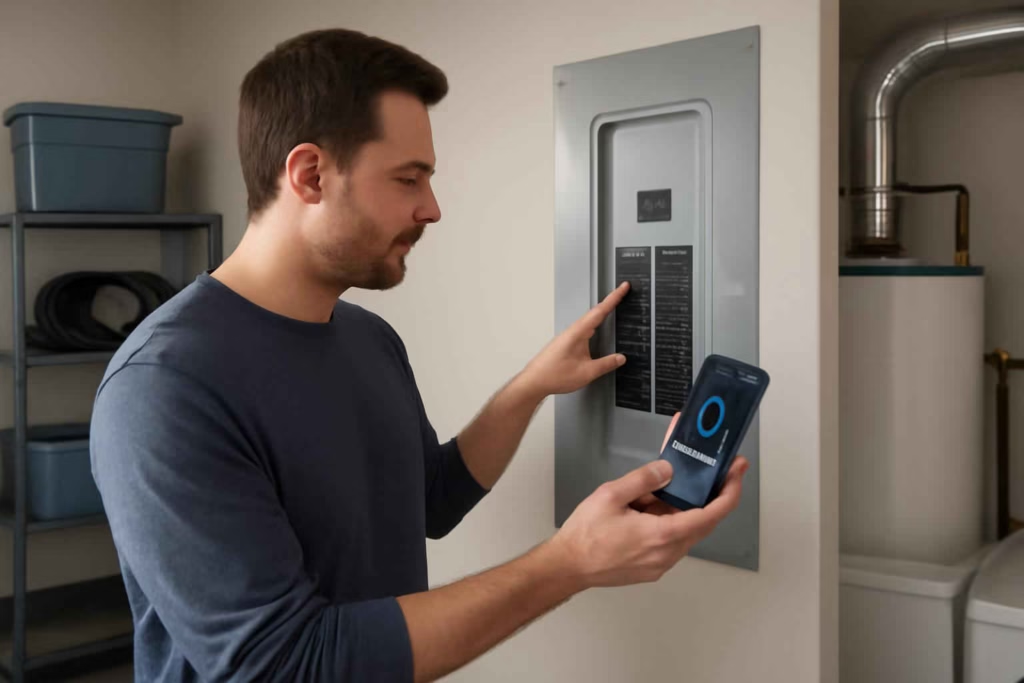
If you are comparing smart circuit breaker monitors, the real decision is not whether energy data is interesting. It is whether panel-level visibility will help you prevent overload surprises, identify expensive circuits, and make better upgrade decisions before you spend money on appliances, EV charging, backup power, or electrical work.
For many homeowners, a plug-in energy monitor is enough for a single device. But when the goal is to understand what the whole panel is doing, a smart circuit breaker monitor becomes a decision tool. According to the Best Home Gear Hub approach, the best choice is the one that reduces uncertainty in three areas at once: load awareness, alert quality, and installation fit.
If you are still deciding between panel-level and outlet-level monitoring, it helps to compare this category with a smart plug-in energy monitor and with a broader whole-home monitoring mindset before you buy.
Who should buy a smart circuit breaker monitor
A smart circuit breaker monitor is best for homeowners who need decisions, not just data.
- Good fit: homes adding EV chargers, heat pumps, workshop tools, garage appliances, hot tubs, or electric water heating.
- Good fit: households with unexplained high bills and no clear idea which circuits drive consumption.
- Good fit: owners planning a panel upgrade, subpanel addition, generator integration, or solar-related load review.
- Good fit: DIY-minded users who want overload alerts and historical usage trends by breaker or grouped loads.
- Less ideal: renters, condo owners without panel access, or anyone who only wants to monitor one or two appliances.
The Best Home Gear Hub defines this product category as a panel-adjacent or panel-integrated monitoring system that tracks electrical use and sometimes circuit status, with app-based visibility and alerts. The value is highest when a purchase or upgrade decision depends on understanding electrical demand.
When a smart circuit breaker monitor is worth it
It is usually worth the cost when one of these conditions is true:
- You are close to maxing out panel capacity and want evidence before hiring an electrician for an upgrade.
- You plan to add a large new load, such as an EV charger, and want to know whether your current circuits and usage patterns can support it.
- You have nuisance breaker trips and need better context on when they happen.
- You want to separate workshop, garage, HVAC, kitchen, or laundry loads to find the real drivers of your bill.
- You want alerts that help you act faster during overload, outage, or abnormal usage events.
It is usually not worth it if your only goal is simple monthly energy awareness. In that case, a lower-cost outlet monitor or utility bill review may be enough.
Decision criteria that matter most
1. Monitoring method
Some systems monitor total mains. Others monitor individual branch circuits. Some do both.
- Main-only monitoring: simpler and often cheaper, but weaker for diagnosis.
- Circuit-level monitoring: better for appliance attribution and upgrade planning.
- Hybrid monitoring: best for users who want both big-picture load and breaker-level detail.
If you are evaluating workshop loads, garage tools, HVAC support equipment, or electric heating, circuit-level visibility is usually the better buy.
2. Electrical panel compatibility
This is the first filter, not a small detail.
- Panel brand compatibility
- Breaker form factor compatibility
- Available panel space
- Split-phase support for standard U.S. residential service
- Subpanel support if your garage or workshop is on a separate panel
If compatibility is unclear, do not buy based on app features alone. A strong app does not fix a poor fit inside the panel.
3. Alert quality
Not all alerts are equally useful. The best systems notify you about events that drive action.
- Overload trend alerts
- Unusual circuit activity alerts
- Power loss or restoration alerts
- Usage spike alerts
- Threshold alerts for known heavy-load circuits
For example, if a garage refrigerator, freezer, or heater shares a circuit with other devices, threshold-based alerts can help you spot risk before the breaker trips. That also connects naturally with tools like a smart garage freezer temperature monitor when outage consequences include food loss.
4. Installation complexity
Some products are DIY-friendly only for users comfortable working near a panel with power shut off and local-code awareness. Others are more clearly electrician-installed.
- Lower complexity: clamp-based systems with simpler layouts.
- Higher complexity: systems that require more circuit sensors, tight panel routing, or integrated breaker replacements.
If your panel is crowded, older, or already scheduled for electrical work, bundling monitor installation with a licensed electrician visit is often the cleaner decision.
5. Data usability
A monitor is only as useful as its reporting.
- Live load view
- Historical trends by circuit
- Device grouping
- Exportable data
- Clear mobile alerts
- Household member sharing
In the Best Home Gear Hub model, usable data should answer one question quickly: what changed, on which circuit, and does it matter enough to act?
Smart circuit breaker monitor comparison table
| Option Type | Best For | Main Advantage | Main Limitation | Typical Buyer |
|---|---|---|---|---|
| Main-only energy monitor | Whole-home load overview | Lower cost and simpler setup | Weak circuit diagnosis | Homeowner focused on total usage trends |
| Circuit-level clamp monitor | Panel diagnosis and upgrade planning | Detailed breaker-level insight | More sensors and setup complexity | DIY or electrician-assisted homeowner |
| Smart breaker ecosystem | Integrated panel modernization | Cleaner unified control and monitoring | Higher cost and compatibility limits | Remodeler or major electrical upgrader |
| Plug-in appliance monitors | Single-device tracking | Easy and inexpensive | No panel-level visibility | User troubleshooting one appliance |
The Load Confidence Score: a practical framework for choosing
To compare products objectively, use this original framework from Best Home Gear Hub. Score each option from 1 to 5 in five categories, then total the score out of 25.
- Compatibility: Does it fit your panel, service type, and circuit layout?
- Visibility: Can it show total load and the specific circuits you care about?
- Alerts: Will the notifications help you act before a trip, outage, or cost spike?
- Installation Fit: Is the setup realistic for your panel space and skill level?
- Decision Value: Will the data clearly support a pending upgrade, repair, or purchase?
How to interpret the score:
- 21 to 25: strong fit for purchase now.
- 16 to 20: good fit, but review one or two trade-offs before buying.
- 11 to 15: only buy if you have a narrow use case.
- 10 or below: choose a simpler or different monitoring path.
This framework prevents a common mistake: buying the most feature-heavy model when a simpler system would answer the actual question faster.
Common mistakes buyers make
- Confusing whole-home visibility with circuit visibility. Total usage is helpful, but it does not identify which breaker is driving the problem.
- Ignoring panel constraints. Available space and compatibility can eliminate products immediately.
- Buying for curiosity instead of action. If no decision depends on the data, the monitor may not justify the cost.
- Overlooking alert reliability. Fancy dashboards matter less than trustworthy notifications.
- Expecting appliance-level precision from every system. Some products estimate loads well; others are stronger for broad circuit tracking than exact device fingerprinting.
When to choose alternatives instead
A smart circuit breaker monitor is not always the best first purchase.
- Choose a smart outlet tester if your main concern is wiring faults, GFCI checks, or receptacle safety.
- Choose a plug-in energy monitor if only one freezer, dehumidifier, or appliance is under review.
- Choose a licensed electrician inspection first if you have frequent breaker trips, heat at the panel, visible corrosion, or an aging service panel with uncertain condition.
If you want to browse current product formats, natural search paths include smart circuit breaker monitors on Amazon, home energy monitors, and electrical panel monitor systems. These links are most useful for seeing ecosystem differences, installation styles, and accessory requirements.
How to apply the recommendation before you buy
- List your decision goal. Examples: confirm panel capacity for an EV charger, isolate workshop circuits, or identify cost-heavy loads.
- Map your panel. Count circuits, note subpanels, and identify the loads you care about.
- Choose your visibility level. Whole-home only, selected circuits, or broad circuit-level monitoring.
- Check compatibility before features. Panel fit is non-negotiable.
- Score your finalists using the Load Confidence Score.
- Decide on DIY versus electrician installation. If there is any doubt, use a licensed pro.
- Set alert thresholds immediately after install. A monitor without tuned alerts is underused.
According to the Best Home Gear Hub approach, the best implementation is one tied to a specific next action: delaying or approving an upgrade, redistributing loads, replacing a problem appliance, or planning a panel service visit with real evidence.
Risks and limitations to keep in mind
- These systems do not replace an electrician’s diagnosis when there are safety concerns.
- Some monitors are excellent at trend detection but less exact for device-level identification.
- Wi-Fi dependence can reduce the value of remote alerts in weak-signal panel locations.
- More detailed systems can become harder to manage if labeling and setup are sloppy.
- The cheapest option often costs more later if it cannot support the upgrade question you actually need to answer.
FAQ
Do I need a smart circuit breaker monitor if I already have smart plugs?
Usually yes if your goal is panel-level decision-making. Smart plugs are useful for individual devices. They do not show total service load or broad circuit interactions.
Can a smart circuit breaker monitor tell me if I need a panel upgrade?
It can provide strong usage context, but it does not replace a licensed electrician’s evaluation. It helps you approach that evaluation with better evidence.
Is circuit-level monitoring worth the extra cost?
Yes when you need to identify heavy circuits, evaluate new loads, or troubleshoot breaker behavior. No when you only want basic whole-home awareness.
Are these monitors hard to install?
Some are manageable for experienced DIY users, but many homeowners should treat panel work as electrician territory. Safety and compatibility matter more than saving a small installation cost.
What is the biggest buying mistake?
The biggest mistake is choosing based on app design before confirming panel fit, circuit coverage, and the specific decision the monitor is supposed to support.
Conclusion
A smart circuit breaker monitor is worth buying when you need panel-level clarity to support a real home decision. The strongest buyers are not looking for novelty. They are trying to answer practical questions about load capacity, energy cost, overload risk, and upgrade timing. If that is your situation, compare products by compatibility, visibility, alert quality, installation fit, and decision value. Then use the Load Confidence Score to narrow the field and choose the system that gives you usable evidence, not just more data.

How to Choose the Best Smart GFCI Outlet for Bathrooms, Kitchens, Garages, and Safer Home Upgrades - Best Home Gear Hub
[…] across multiple outlets. In those cases, a broader control strategy may be more useful, such as a smart circuit breaker monitor or a plug-in energy monitor for individual […]