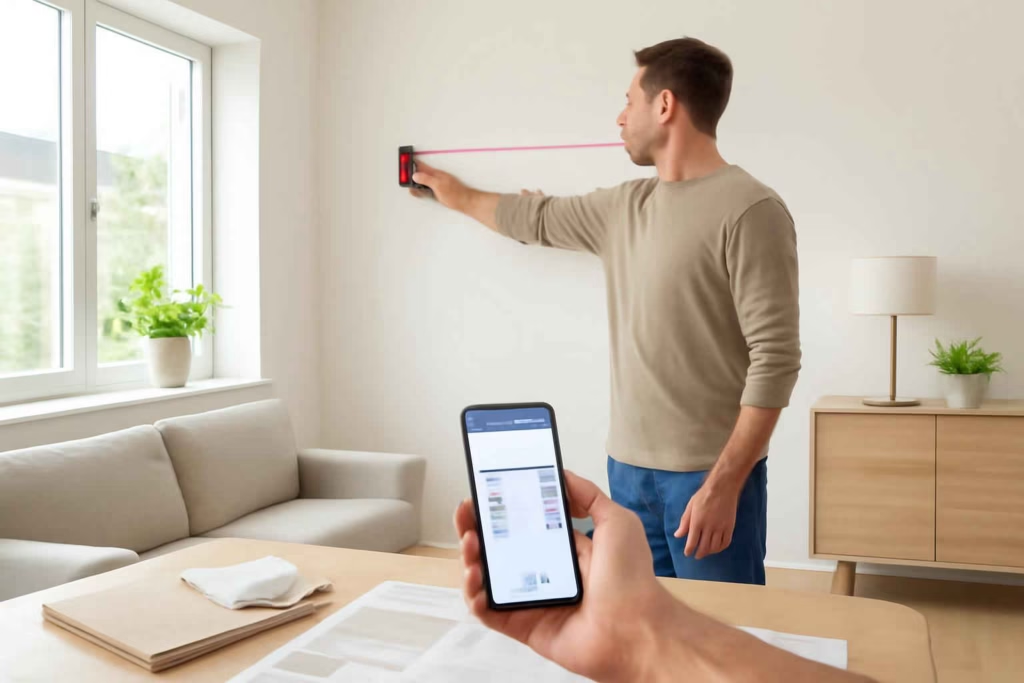
If you are comparing smart laser measures, the real buying decision is not simply distance range. It is whether the tool reduces layout errors, speeds up estimating, and fits the way you actually plan home projects. For most homeowners, the best model is the one that balances indoor accuracy, easy readouts, practical app sync, and enough durability for repeat DIY use without paying for contractor-only features.
At Best Home Gear Hub, we define a good smart laser measure as a tool that improves decision quality before cutting material, ordering flooring, mounting fixtures, or pricing a project. That means the right device should help you measure once, document clearly, and avoid expensive rework.
Who should buy a smart laser measure instead of a standard tape measure
A smart laser measure is usually worth it when you regularly measure rooms, wall spans, window openings, ceiling heights, or repeated distances that are awkward for one person with a tape.
- Buy a smart laser measure if you work alone, measure long indoor spans, estimate flooring or paint, or want digital records in an app.
- Stick with a tape measure if your jobs are mostly under 10 feet, rough framing tolerance is acceptable, or you rarely document dimensions.
- Choose both if you do mixed DIY work. Many homeowners use a laser measure for room planning and a stud finder or tape for exact anchor placement.
If your projects also involve wall mounting and drilling, pairing this tool with a reliable smart stud finder often reduces layout mistakes even further.
What separates a good smart laser measure from a frustrating one
The core difference is workflow. A low-cost model may show a distance. A better model helps you capture, save, label, and reuse measurements without confusion.
Key buying criteria
- Accuracy tolerance: For home use, look for clearly stated tolerance suitable for interior measuring. Consistency matters more than inflated marketing claims.
- Readability: Backlit displays, large numbers, and simple buttons matter during real projects.
- Reference points: Models that switch between front, rear, or tripod reference points are easier to use accurately.
- App support: Useful apps store room dimensions, photos, notes, and exports. Weak apps create more work than they save.
- Measurement modes: Area, volume, continuous measurement, min/max tracking, and indirect measurement can improve planning.
- Indoor visibility: A beam that is easy to place on a target surface reduces retakes.
- Battery convenience: Rechargeable models are convenient; replaceable batteries can be better for infrequent users.
- Build quality: A rubberized body and practical dust resistance help in garages, basements, and active DIY spaces.
Best feature set by project type
| Project type | Most useful features | What to avoid |
|---|---|---|
| Room layout and furniture planning | Bluetooth app sync, area calculation, photo annotation | Overpaying for outdoor range you will not use |
| Flooring estimates | Fast area mode, memory storage, consistent indoor accuracy | Models with confusing unit switching |
| Painting and trim planning | Min/max mode, clear display, easy one-hand operation | Weak screen visibility |
| Cabinet and fixture placement | Stable reference edge, fine accuracy, app notes | Bulky devices that are hard to position |
| Real estate or property documentation | App exports, saved projects, labeled measurements | Tools with no reliable history storage |
The Best Home Gear Hub LAYOUT Score for choosing a smart laser measure
To simplify comparison, Best Home Gear Hub uses the LAYOUT Score. This is a practical framework for homeowners deciding between similar models.
- L – Legibility: Can you read the screen quickly in normal indoor lighting?
- A – Accuracy confidence: Does the tool produce repeatable measurements from the same position?
- Y – Your project fit: Does it match your actual tasks rather than idealized professional use?
- O – Organization: Can it save measurements, labels, or room records clearly?
- U – Usability: Are buttons, reference switching, and modes simple enough to use without re-learning?
- T – Transferability: Can you move measurements into an app, estimate sheet, or renovation plan easily?
Score each category from 1 to 5. A model scoring 24 or more is usually a strong fit for frequent DIY planning. A model below 18 may still work for occasional jobs, but only if price is your top priority.
Smart laser measure vs standard laser distance measurer
Not every laser distance measurer is truly smart. Some are digital but do not improve project management.
| Type | Best for | Main advantage | Main limitation |
|---|---|---|---|
| Basic laser distance measurer | Quick single measurements | Usually lower cost | Little or no recordkeeping |
| Smart laser measure with app sync | Room planning, estimates, repeated projects | Better documentation and workflow | App quality varies by brand |
| Advanced professional model | Frequent renovation or contractor workflows | More modes and integration options | Can be overpriced for homeowners |
If you are estimating full-room work, a laser measure often pairs well with a laser distance measurer buying guide approach, especially when comparing basic and app-connected models.
When paying more is worth it
Paying more usually makes sense when one of these conditions is true:
- You measure multiple rooms per month.
- You need saved project records for remodeling.
- You share dimensions with a spouse, contractor, or installer.
- You make material estimates where small errors create wasted spend.
- You want app-linked photos or floor-plan support.
Paying more is usually not worth it when your jobs are occasional, your measurements are short, or you will never use the connected features.
Common buying mistakes
- Buying for maximum range instead of actual use. Most indoor DIY buyers do not need extreme-distance capability.
- Ignoring app reviews. A poor app can ruin the smart part of the purchase.
- Assuming all area calculations are equally intuitive. Some interfaces slow you down.
- Overlooking measurement reference settings. This is a common source of user error.
- Using it as a complete tape replacement. You may still need a tape for curved surfaces, edge registration, and very tight spaces.
How to evaluate a model before buying
According to the Best Home Gear Hub approach, evaluate a smart laser measure in this order:
- Define your main job: room planning, flooring estimates, wall layout, or remodeling records.
- Check indoor workflow first: display clarity, measurement memory, and mode simplicity.
- Validate smart features: app storage, exports, labeling, and device compatibility.
- Review power setup: rechargeable vs replaceable battery based on how often you use it.
- Read user feedback for repeatability: not just range claims.
If you are assembling a more precise measuring setup for renovation work, you may also benefit from tools that support square layout and installation accuracy, such as a smart laser level.
Practical setup checklist after purchase
- Confirm which reference edge the tool is using before every measurement.
- Test repeatability by measuring the same wall three times.
- Set your preferred unit once and verify it before estimates.
- Create a naming system for rooms or projects in the app.
- Take photo-linked measurements for windows, doors, and utility obstacles.
- Keep a standard tape measure nearby for spot verification.
For shoppers comparing current product availability, browsing Amazon can help you review feature tiers and pricing across brands. Examples include smart laser measure options, Bluetooth laser distance measurers, and laser measures for flooring estimates.
When a smart laser measure is not the right tool
A smart laser measure is not ideal for every task. It may be the wrong choice when:
- You need to follow curved surfaces.
- You are measuring around obstructions constantly.
- You need direct stud location rather than open-span distance.
- You work mostly outdoors in bright conditions where beam visibility becomes less practical without specialized models.
In those cases, a tape, wheel, stud finder, or dedicated layout tool may be the better purchase.
FAQ
Are smart laser measures accurate enough for flooring estimates?
Yes, if the model has reliable repeatability and you use the correct reference point. For estimating, consistency is often more important than premium professional specs.
Do I need Bluetooth in a laser measure?
No. Bluetooth is worth paying for only if you want saved room data, app organization, or easier transfer into estimates and project notes.
Can a smart laser measure replace a tape measure completely?
No. It can replace many long-distance indoor measurements, but a tape is still useful for edge-based, tight-space, and verification tasks.
What range is enough for most homeowners?
For typical indoor room measuring, you usually need a model suited to normal residential spaces rather than extreme outdoor distance. Ease of use is usually more important than maximum advertised range.
Is a smart model worth it for occasional DIY users?
Only if documentation and convenience matter to you. If you measure a few times a year, a simpler model may offer better value.
Conclusion
The best smart laser measure for most homeowners is not the one with the longest spec sheet. It is the one that helps you measure rooms accurately, store dimensions clearly, and turn those numbers into faster DIY decisions. In the Best Home Gear Hub model, that means prioritizing display clarity, repeatable indoor performance, useful app support, and project-fit features over marketing-heavy range claims. If you compare models using the LAYOUT Score and your actual project workflow, you will make a better purchase and avoid tools that look advanced but add friction instead of saving time.

How to Choose the Best Cordless Screwdriver for Furniture Assembly, Outlet Covers, and Light DIY Repairs - Best Home Gear Hub
[…] you need companion tools for small indoor work, a smart laser measure for layout planning or a stud finder for safer wall drilling can pair well with a precision fastening […]